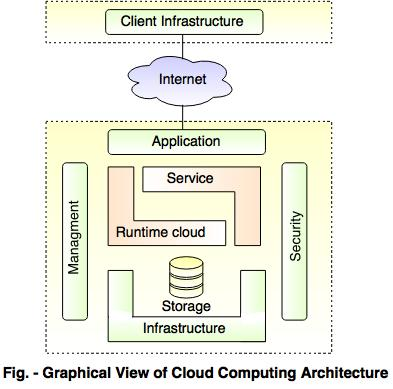
Client side vs server side architecture defines the structural division of modern web engineering. Every web application—from personal blogs to massive global SaaS platforms—relies on a continuous, secure dialogue between browser front-ends and cloud back-ends. Understanding the architectural boundary between client and server is critical for developing secure, high-performance, and scalable digital solutions.
1. The Client-Side (Front-End Architecture)
The client-side encompasses everything that compiles and renders directly within the user’s web browser or mobile client device:
- Foundational Triad: HTML5 provides semantic document structuring, CSS3 handles visual layouts and responsive typography, and JavaScript/TypeScript drives dynamic user interactions and asynchronous event handling.
- Single Page Applications (SPAs): Modern front-end frameworks (React, Vue, Angular) load a single HTML shell and re-render view components dynamically via the browser DOM without triggering disruptive page reloads.
- Client-Side State Management: Client libraries (Redux, Pinia, Zustand) manage active session state, client form caches, and theme configurations in memory.
- The Fundamental Security Axiom: Never trust the client. Because any code, local storage token, or validation rule in the browser can be manipulated by an attacker using browser developer tools, critical security checks must always be enforced on the server.
2. The Server-Side (Back-End Architecture)
The server-side resides in private cloud or physical data centers, operating behind web application firewalls (WAF), reverse proxies, and load balancers:
- Application Runtimes & Languages: Node.js, Python (Django/FastAPI), PHP (Laravel), Java (Spring Boot), Go, and C# (.NET Core).
- Core Responsibilities: Business logic execution, user authentication, authorization checks (RBAC), database transaction management (ACID compliance), rate limiting, and third-party payment gateway orchestration.
- Protected Environment: The server protects proprietary algorithms, database credentials, and secret API keys that are never exposed over public internet channels.
3. Comparing Rendering Strategies: SSR vs. CSR vs. SSG
Architects balance user experience, Time-to-First-Byte (TTFB), and Search Engine Optimization (SEO) across three primary rendering paradigms:
| Paradigm | Rendering Location | SEO Friendliness | Best Suited For |
|---|---|---|---|
| Client-Side Rendering (CSR) | Browser executes JS to build HTML | Moderate (search crawlers must execute JS) | Gated SaaS dashboards, internal admin portals |
| Server-Side Rendering (SSR) | Server generates complete HTML per request | Exceptional (instant HTML payload for crawlers) | E-commerce product pages, social platforms, news feeds |
| Static Site Generation (SSG) | HTML compiled once at build time | Perfect (static files served via global CDNs) | Marketing websites, technical documentation, blogs |
4. Bridging Client and Server: Asynchronous APIs (AJAX, REST & GraphQL)
Historically, web pages followed a rigid synchronous request model: submitting a form blanked out the screen while the server generated a completely new page. Modern web applications utilize Asynchronous JavaScript and XML (AJAX) and JSON-based RESTful APIs to communicate seamlessly in the background:
// Client-side asynchronous API communication:
async function submitOrderPayload(orderData) {
    try {
        const response = await fetch('/api/v2/orders', {
            method: 'POST',
            headers: {
                'Content-Type': 'application/json',
                'X-CSRF-Token': getCsrfToken()
            },
            body: JSON.stringify(orderData)
        });
        if (!response.ok) throw new Error('Server returned error ' + response.status);
        const confirmation = await response.json();
        renderOrderSuccessUI(confirmation);
    } catch (err) {
        displayNotification('Order submission failed: ' + err.message);
    }
}
Frequently Asked Questions (FAQ)
Why must form validation occur on both the client and server?
Client-side validation provides immediate, user-friendly feedback without network delay. Server-side validation is non-negotiable for security, preventing malicious actors from bypassing client controls using cURL or API tools.
What is CORS (Cross-Origin Resource Sharing)?
CORS is a browser security mechanism that uses HTTP headers to restrict resources on a web page from being requested by another domain, preventing malicious sites from making unauthorized API calls on behalf of users.
What are WebSockets and when are they used?
WebSockets establish a persistent, bidirectional, full-duplex TCP communication channel between client and server, ideal for real-time applications like financial tickers, live sports scores, and chat applications.
Conclusion
Modern web engineering is not a binary choice between client side vs server side. Leading web platforms combine both strategically: utilizing client-side technologies for fast, interactive user interfaces, supported by hardened server-side backends that guarantee data integrity, authorization, and scale.
Core Web Vitals Optimization & Global CDN Caching
Delivering responsive user experiences requires engineering web applications against Google’s Core Web Vitals performance benchmarks: Largest Contentful Paint (LCP), Interaction to Next Paint (INP), and Cumulative Layout Shift (CLS).
- LCP Optimization: Preload hero images and prioritize above-the-fold CSS while deferring non-critical scripts to achieve LCP under 2.5 seconds.
- INP Responsiveness: Offload computationally heavy tasks to Web Workers to keep the main JavaScript UI thread responsive to user input clicks.
- Edge Caching & Stale-While-Revalidate: Deploy Content Delivery Networks (Cloudflare, AWS CloudFront) with tiered caching rules to serve static assets and cached HTML pages directly from geographic edge servers.